Originally posted on
VoIP & Gadgets Blog, here:
http://blog.tmcnet.com/blog/tom-keating/headsets/plantronics-m100-review.asp.
The Plantronics M100 Bluetooth headset has arrived and here is my unboxing + review. The first feature you should be aware of is the dual mics on the M100. When the dual mics are combined with the built-in Digital Signal Processing (DSP) and Plantronics wind and background noise reduction technology, in theory you have the best damn sounding headset on the planet.
Here's a couple photos of the Plantronics M100:
 Ear-bud and microphones side
 Plantronics M100 Rear showing Micro-USB charging connectionReview Analysis:
I paired the M100 with my iPhone 3GS. It didn't ask for a PIN/passcode, but the default is 0000 if it does ask. The M100 supports multipoint so you can pair the headset with two Bluetooth devices, a very convenient feature. After pairing the M100 with my iPhone 3GS, the first thing I noticed was an extra battery meter on the iPhone screen. This is a pretty cool feature. It enables you to monitor the level of the headset battery on your iPhone screen. No more guessing how much battery life your BT headset has. I haven't seen this one any other Bluetooth headset I've tested on the iPhone, but obviously
Apple must have "baked in" this functionality into the phone firmware to support it. I asked Plantronics about the battery meter and they said this is the first headset of theirs supporting this feature, but other headset manufacturers have the ability to do this as well. Plantronics said they are working on adding a battery meter to Blackberry and Android devices.
In any event, the battery meter is located in the top right corner as seen here (located in-between the Bluetooth logo and the 84% iPhone battery life):
 Testing Call Quality
 Next, I made a test call to my iPhone and pressed the talk button on the M100 to answer the call. The sound quality was excellent. I put the wind reduction technology to the text by driving with my driver and passenger-side window down and making a call. It does a pretty amazing job. The two mics assist in locating the primary sound (your voice) and subtracting ambient sound such as wind noise. Interestingly, the 3x3 hole grid located where you would expect the microphone to be is purely cosmetic. Plantronics put it there simply because customers are expecting a microphone to be there, but actually the mics are actually pinholes located on the side on the headset positioned about 1/2" apart.
You can switch it from left ear to right ear pretty easily just by rotating the eartip. As for comfort level, it's on part with other Plantronics Bluetooth
headsets I've tested. It's pretty comfortable and pretty snug, so most users will probably remove the optional ear loop that comes attached.
Plantronics decided to keep it simple and instead of volume up and volume down, there is only one volume button which toggles between the various volume settings - Min-Lo-Med-Hi-Max (and back to Min). Each time you press the volume button one headset it plays a single tone. I'm used to having a volume up and down, so I found myself initially "overshooting" the Max volume setting and going back to Min. However, I quickly realized that the M100 plays a special double-tone to indicate when you've reached maximum volume, so I haven't overshot it since. It's worth adding that the M100 headset automatically adjusts volume levels when moving in and out of noisy environments to ensure clear conversations. I found this automatic volume adjustment to work quite well and rarely had to adjust the volume manually.
Charging / Battery LifeWhen the headset LED flashes red 2 times and plays 2 tones, the battery is low. When it gets critically low it flashes red 3 times or the voice alert says "recharge headset" when there is less than 10 minutes of talk time remaining. Also, the headset features voice alerts that tell you mute status as well as low battery and remaining talk time. Thus, after full charging and then turning it on it will first say "Power On" and then "Talk time 6 hours".
Charging takes 30 minutes for 2 hours talk time and 90 minutes for a full charge with up to 6 hours of talk time. I didn't test to see if I could get a full 6 hours of talk time, however I did make an hour phone call and the battery meter on the iPhone barely budged.
Plantronics Interview / Thoughts
I spoke with Plantronics Jeff Ducote, category director for Bluetooth products about the M100 and a few other products they are launching this Fall. Jeff told me that
NPD Group's retail data report showed that year-over-year Plantronics grew from 25% market share to 35-40% market share for Bluetooth headsets (mono and stereo) - an impressive jump.
Jeff Ducote said the packaging is entirely recyclable and is made from recyclable materials. I mentioned the "look" of the headset packaging (clean white look with blue and black colors) had an Apple-esque feel to it and it looked like it belonged in the
Apple Store. Jeff confirmed the headset would be carried in the Apple Store.
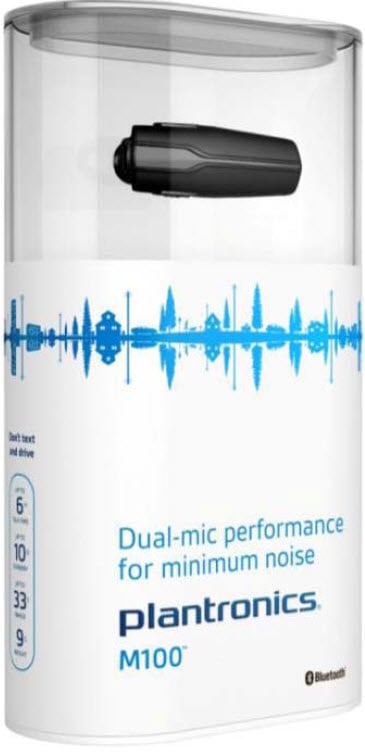
One really cool design feature on the M100 packaging is the sound wave. Well, it's not really a sound wave, but its actually a pictogram consisting of a jogger with a dog (obviously wearing a BT headset), telephone poles symbolizing communications, cars symbolizing where Bluetooth headsets are often used, as well as a motorcycle, bicycle, convertible, house, skyscraper, and more. At a distance it looks like a sound wave form, which will attract consumers to it on a shelf, but on closer inspection you can see the discrete picture elements. You can click the packaging picture to the right for a slightly larger image to see for yourself.
Plantronics is doing a major branding change from the current Explorer, Voyager, and Discovery headset model names. Jeff said, "We're going to what is expected in the consumer environment, especially in consumer electronics where our naming convention will also tie in with that good, better, best and be consistent with that. As you move from an entry level that might be M10, you go to the M100 in the mid tier to M1000, as an example. That natural progression upward that shows a higher level of product."
Features / Specs of the M100:- The M100 Headset automatically adjusts sound levels so you can hear every word clearly when moving in and out of noisy environments.
- Find the Best Fit - The lightweight design offers multiple wearing options for a staple, comfortable fit - with or without glasses. Choose from soft gel eartips, in 3 different sizes, and an Optional clip-on earloop to find the best fit.
- Voice alerts announce remaining talk time, low battery, phone connections and Mute status, providing important information when you need it.
- Know When to Recharge - When the headset LED flashes red 3 times or the voice alert advises to recharge headset, then there is less than 10 minutes of talk time remaining. iPhone users can also Monitor the level of the headset battery onscreen.
- Echo cancellation
- 9 Grams
- Dimensions: 55 x 18.5 x 8.1mm
- Talk/Standby time: Up to 6 Hours / 10 Days
- Operating distance: Up to 33 feet (10M), Class II
- Charge connector: Micro USB charging
- Battery type: Rechargeable Lithium ion polymer
- Charge time: 90 minutes for full charge
- Bluetooth version: 2.1 specifications with EDR
- Bluetooth profiles: Hands-Free (HFP) Profile 1.5 and Headset (HSP) Profile 1.1
ConclusionPlantronics is positioning the M100 as their mid-tier Bluetooth headset. I asked what would make the headset a "premium" headset and Plantronics said there are some premium products with additional enterprise functionality coming out in the Fall. Plantronics would not disclose additional details except to say the premium product is "more solution-based - you're adding different levels of value whether it's from a productivity or utility standpoint - where you combine software and hardware applications."
I can almost guarantee the M1000 will come with a Bluetooth dongle for connecting to a PC so you can use the M1000 in the enterprise to be used in conjunction with a SIP softphone,
Microsoft Communicator, or other enterprise voice application. Make no mistake, the M100 has premium sound with the performance of the dual mics, DSPs, wind reduction, and the automatic sound level adjustments. Right now, it's my favorite Bluetooth headset. So if you can skip the value-add "premium" enterprise application support + Bluetooth dongle, then this is the headset I recommend you buy.