By Ray Horak, Technology Editor telecomreseller.com
Aastra mobility solution now available for Microsoft Lync
Aastra Technologies Limited (TSX: AAH) is a leading developer and manufacturer of telecommunications networking products and services based on IP as well as traditional TDM technologies. The Toronto-based company, formed in 1983 as an R&D business, grew to offer a portfolio of communications servers, gateways, telephone terminals, VoIP endpoints, wireless products and advanced software applications for enterprise markets. We keep a pretty close eye on Aastra from our lofty editorial vantage point here at Telecom Reseller. The company has built a reputation for being quick on its feet and highly innovative. Those are important attributes these days.
Among the more recent innovations is the integration of SmartSIP 2.0 for Microsoft Lync Server 2010 from Network Equipment Technologies (NET) with Aastra’s award winning SIP-DECT mobility solution and broad portfolio of standards based SIP phones. The Aastra SIP-DECT phones are the first to be fully certified with NET SmartSIP, by the way. NET’s SmartSIP 2.0 is a software app that provides Lync voice interoperability for SIP devices. In a Lync environment, SmartSIP 2.0 includes presence functionality, extends the enterprise’s existing SIP endpoints and enables 802.11 WiFi and DECT wireless Devices. As a result of this level of integration, Aastra’s SIP-DECT handsets operate just as any other SIP endpoint on the Lync IP network, but provide the added dimension of mobility that is so critical in industries such as healthcare, retail, hospitality, and distribution/logistics. Aastra’s SIP-DECT handsets offer a number of considerable advantages over WiFi, including spectrum diversity, which avoids competition for bandwidth with other devices, resulting in improved QoS and security through special encryption algorithms. As DECT consumes considerably less power than Wi-Fi, SIP-DECT phones have much longer talk and standby times. Aastra’s SIP-DECT is also highly scalable and includes a variety of handsets to suit a range of business requirements. Thanks to pre-built configuration files, SmartSIP supports automatic provisioning.
Aastra’s SIP-DECT solution is based on mature technology and open standards, so it is equally effective on not only Aastra and Lync platforms, but also on all third-party systems or Centrex platforms of Internet Telephony Service Providers (ITSPs). In other words, VoIP solutions, including multi-cellular DECT radio networks, can be installed wherever data lines are available in a company. This includes remote company locations such as branches or factories, interconnected via a Virtual Private Network (VPN), for instance.
Also recently released are Aastra’s 6725ip and 6721ip IP desk phones for Microsoft Lync. These IP endpoints feature embedded Microsoft Lync 2010 Phone Edition, offering seamless integration to Microsoft’s Lync Server 2010 and, thereby, providing for the fullest Lync feature set available, including simplified installation, management and configuration. Aimed at the knowledge worker, the 6725ip provides a synchronized integration with the desktop client enabling enhanced functionality, including click-to-dial and desktop control of calling features such as transfer, hold, call park and conferencing. The 6725ip features both a full color 3.5” LCD screen and a separate Unified Communications (UC) presence icon providing direct access to features and presence indications in Lync. The 6721ip provides a lower cost option for users who still require the benefits of a true IP phone, including dual Gigabit Ethernet ports and message waiting light indicator – but do not require the full UC desktop integration capabilities of the 6725ip. The 6721ip is an ideal selection for Hot-desking applications and common areas, such as lobbies and meeting rooms.
More at aastrausa.com.


Thursday, September 8, 2011

Panasonic Rolls Out New Series of Corded SIP Phones
By Beecher Tuttle
TMCnet Contributor
Panasonic broadened its portfolio of business-centric solutions recently by launching a new line of corded desktop SIP phones for the small and mid-size business sector.
TMCnet Contributor
Panasonic broadened its portfolio of business-centric solutions recently by launching a new line of corded desktop SIP phones for the small and mid-size business sector.
The new models, dubbed the UT Series, will provide end users with all of the next-generation communication features associated with IP telephony, and at an extremely competitive price.
Panasonic's corded SIP phones are exceptionally flexible and scalable, and are interoperable with a wide range of SIP-based IP PBX platforms and Hosted Service Providers. Certified by BroadSoft on Broadworks and Digium's Asterisk, each of the four new models includes support for Power over Ethernet and high definition audio (G.722 codec).
The cost savings associated with routing the calls over the Web is further supplemented by the SIP phones' low power consumption. When not in use, the phones fall into Eco mode and draw less than one watt of power.
"The benefits of a standards-based approach, such as with SIP phones, are especially compelling in today's business environment where every dollar counts and flexibility and reuse are highly desirable," Bill Taylor (News - Alert), president of Panasonic System Networks Company of America, noted in a statement.
"Panasonic's SIP phones are designed to be expandable at no additional cost, without sacrificing quality," he added. "Our phones are also easily provisioned and interoperable, allowing the customer to expand their communication capabilities as their needs grow."
By launching the four phones, KX-UT136-B, KX-UT133-B, KX-UT123-B and KX-UT113-B, Panasonic is adding to its established line of cordless SIP models, which provide similar functionality and support.
The KX-UT123-B and KX-UT113-B models are the line's two most competitively priced desktop phones. Each model sports a three-line LCD display and is accompanied by a two-year limited warranty. The KX-UT113 is equipped with one Ethernet port, while the KX-UT123 has an additional port and a backlit graphical display. Both models include a comprehensive phone book and support for multi-party conferencing, among other features.
Panasonic's most advanced corded SIP phones – the KX-UT136-B and the KX-UT133-B – each contain 24 programmable feature/functionality keys and two Ethernet ports for connecting a secondary device. The KX-UT133-B boasts a three-line backlit graphical LCD display, while the KX-UT136-B is loaded with a six-line backlit LCD.
All four models can be easily configured and provisioned to grow with a company's needs. In addition to being extremely user friendly, the SIP phones provide industry-leading voice quality and bandwidth utilization.
Beecher Tuttle is a TMCnet contributor. He has extensive experience writing and editing for print publications and online news websites. He has specialized in a variety of industries, including health care technology, politics and education. To read more of his articles, please visit his columnist page.
Lijia Baby Enhances Collaboration and Customer Service in China with Avaya IP Office
For Immediate Release:06 Sep 2011
- System provides rich communication features to staff in 4 offices across China
- The 100-seat call centre ensures prompt customer service
- System is easy to manage and flexible to expand to accommodate future business needs
With IP Office, Avaya's flagship solution for Small and Medium Enterprises, Lijia Baby is able to efficiently connect its four offices in China, and provide the 400+ staff with rich features such as voice call, voice mail, call transferring, and conferencing. For mobile workers, like those who roam around the more than 40 retail stores of the company, mobility features are available so that they don’t miss calls when out of office.
Lijia Baby has also built up a 100-seat contact center with IP Office, which can handle 15,000 calls per day during peak time. The built-in intelligence of IP Office can route calls quickly and accurately to the right agents, so that customers can get timely and personalized services. No matter where they placed the orders – with contact center staff, on Lijia Baby's website, or at one of the retail stores - customers can get consistent service from the company's agents.
Management of the system can be achieved easily from one central location, eliminating time and travel costs. Adding new phones or other devices is a matter of plugging them in and powering on, and Lijia Baby staff can move a device from extension to extension, even to another location, without having to "re-administer." In addition, the system can be easily expanded to connect up to 32 sites if and when needed.
Quotes:
• "In this highly competitive and demanding market, efficiency and customer satisfaction are crucial to our success. Avaya IP Office has generated concrete business values for us in terms of productivity enhancement, customer care, and even cost control. It has also proved to be a very flexible platform that can meet our needs as we grow."
— Wang Liang, President of Lijia Baby
• "SME customers need advanced communications capabilities to stay competitive, as much as larger enterprises do. But they are often hindered by cost considerations and the complexity of managing such systems. Avaya IP Office provides SMEs with an affordable and flexible solution, and helps them "think big." As we can see with the case of Lijia Baby, they now benefit from rich communications features which used to be available only to large enterprises, and hence are able to differentiate themselves in the market."
— John Wang, Managing Director, Avaya Greater China
Additional Resources:
• Product: Avaya IP Office
• Video: The Agency Group – Upgrade to Avaya IP Office
Tags:
Avaya, IP Office, SME, unified communication, flexibility, collaboration
About Avaya
Avaya is a global provider of business collaboration and communications solutions, providing unified communications, contact centers, data solutions and related services to companies of all sizes around the world.
Polycom Helps 35 Healthcare Institutions in 13 Countries
 Polycom Helps 35 Healthcare Institutions in 13 Countries Improve Training and Patient Care With Polycom Telepresence, Award-Winning International Virtual e-Hospital Uses Polycom Telepresence for Face-to-Face Distance Learning and Training in Kosovo and Across Europe, the Middle East, and North and South America
PLEASANTON, CA–(Marketwire – Sep 7, 2011) – Polycom, Inc. (NASDAQ: PLCM), a global leader in unified communications (UC), and the International Virtual e-Hospital (IVeH) have partnered on a new model that enables medical professionals to collaborate via video and share their expertise across 35 healthcare and academic institutions globally, thanks to an innovative Polycom video collaboration program that has helped rebuild Kosovo’s medical system. With its success clearly demonstrated, the model is now being deployed more broadly in new regions outside the Balkans including Africa, the Middle East, South Eastern Europe, and South America.
The world-renowned International Virtual e-Hospital (IVeH) was established in 2001 by Dr. Rifat Latifi to create sustainable telemedicine and e-health programs around the world and to rebuild medical systems in developing countries. Launched as the Telemedicine Program of Kosovo (TPK), the program has since connected seven Kosovan hospitals via telemedicine and provided access to an electronic medical library for distance learning with video facilities in Albania, Austria, Brazil, Canada, Finland, Germany, Italy, Norway, Saudi Arabia, Switzerland, UK, and the U.S.
Each telemedicine center in Kosovo contains video collaboration rooms, tele-consultation rooms, and telemedicine training rooms, as well as mobile telepresence units in patient rooms which results in better patient care and improved trainings and resources for hospital physicians and staff. The video rooms are equipped with a Polycom high-definition room video collaboration system supported by a central Polycom® RSS™ 2000 video recording and streaming solution. The RSS 2000 solution is a centralized server used by each center for recording, streaming, and archiving multimedia conferences and training sessions. This saves time and resources while extending communication and enabling knowledge-sharing throughout Kosovo and international medical communities.
“The Polycom video conferencing solution helps us quickly share knowledge, train the next generation of medical providers, and conduct consultations with worldwide experts to ultimately improve patient care,” said Dr. Latifi, IVeH founder. “Thanks to the access to the World Health Organization’s (WHO) medical library as well as experts around the world, regional telemedicine centers are now able to develop their own educational programs based on this vast resource; this electronic library logged approximately 54,000 visits within the first three years of operation. The telemedicine centers provide us with a timely, reliable, and accessible way to bring content, experts, and organizations together in a more productive and cost-efficient way.”
Background: The Existing Infrastructure
The medical infrastructure of Kosovo was left in a poor state by wars, underfunding, and bad management. An entire generation of medical graduates after the Balkan wars of the 1990s had not seen a patient in a clinical environment throughout their entire education, and many medical school classes were held in the basements of homes. Additionally, many older professors, surgeons, and other doctors had not practiced advanced medicine or surgery for more than a decade. For Dr. Latifi, telemedicine and medical distance learning were the only practical solutions for developing countries such as Kosovo.
Delivering Life-Saving Medical Resources
With government approval in place, as well as backing by the European Agency for Reconstruction (EAR), seven telemedicine centers were established throughout Kosovo with tele-consultation rooms and telemedicine training rooms. Mobile Polycom units are also located at patients’ bedsides to allow real-time collaboration with specialist physicians in other countries. This contributes to better consultations and improved patient care. The IVeH delivers powerful educational tools to medical personnel at the right time. As a result, tens of thousands of doctors, nurses, other healthcare professionals and IT personnel can be trained on how to use telemedicine and e-health applications through interactive, hands-on lectures. In addition, the telemedicine program introduced life-saving resources and procedures to Kosovo hospitals through external medical libraries and other expert resources.
For more details, visit www.polycom.com
Tuesday, September 6, 2011
Avaya Positioned as a Leader in Analyst Firm's Magic Quadrant for Unified Communications
Avaya Cited as a Unified Communications Leader Based on 'Ability to Execute' and 'Completeness of Vision'

BASKING RIDGE, NJ, Sep 06, 2011 (MARKETWIRE via COMTEX) -- Key Takeaways:
       --  A company's 'ability to execute' is based on the quality, efficacy and
           overall maturity of the products, systems, tools and procedures that
           enhance individual, group and enterprise communications
       --  Completeness of vision is based on the ability to convincingly
           articulate logical statements about current and future market
           directions, innovations, customer need and competitive forces
Avaya, a global provider of business communications and collaboration systems and services, today announced it has been positioned as a Leader in the recently published 2011 Gartner Magic Quadrant for Unified Communications*.
In the report, Gartner finds that "the overall UC market has matured and evolved significantly in 2011. The most notable change has been the shift in emphasis from broad UC portfolios toward fuller UC suites. Other important factors influencing the market were the convergence of cloud and on-premises UC functions, the increased role of consumer products and the continued influence of mobility."
Avaya's UC Portfolio Avaya's flagship UC suite for mid-to-large size enterprises, Avaya Aura(R), offers voice, video, conferencing, messaging, presence services, and session management, enabling centralized management and administration, plus integration and interoperability with systems and applications from Avaya and other vendors.
In the past year, Avaya also launched the groundbreaking, Avaya Flare(R) Experience -- a unique tool for end-users that brings together the range of communications people regularly use today -- voice, video, conferencing, email, IM/presence, multiple directories and more -- and puts them at their fingertips, thus streamlining collaboration by removing the typical barriers between technologies.
Quotes: Dr. Alan Baratz, Senior Vice President, Avaya
President, Global Communications Solutions, Avaya "We have a simple goal for Avaya unified communications solutions: enable any employee to use any device in any location to collaborate effectively. This can mean enabling a nurse to launch a call to a doctor from a patient care application, or enabling ad hoc collaboration that starts as an IM, escalates to a multiparty conference call with document sharing -- all with the swipe of a finger. Avaya delivers a powerful, integrated experience for end-users that's easy for IT to manage and highly cost-effective for the business."
Additional Resources:
       --  Gartner Magic Quadrant for Unified Communications:

http://www.gartner.com/technology/streamReprints.do?id=1-1728DMD&ct=110823&st=sb            --  Avaya Aura:

http://www.avaya.com/usa/resource/assets/brochures/avaya%20aura%20-%20brochure%20uc4218%20v2.pdf            --  Avaya Flare Experience Guided Tour:

http://www.avaya.com/usa/campaign/avaya-flare-experience-guided-tour/
Tags: Avaya, unified communications, business collaboration, Avaya Aura, Avaya Flare Experience, enterprise communications, Gartner
* Bern, Blood, Steve, Dozier, Linda; Magic Quadrant for Unified Communications; Gartner Research, August 22, 2011
About the Gartner Magic Quadrant: The Magic Quadrant is copyrighted 2011 by Gartner, Inc. and is reused with permission. The Magic Quadrant is a graphical representation of a marketplace at and for a specific time period. It depicts Gartner's analysis of how certain vendors measure against criteria for that marketplace, as defined by Gartner. Gartner does not endorse any vendor, product or service depicted in the Magic Quadrant, and does not advise technology users to select only those vendors placed in the "Leaders" quadrant. The Magic Quadrant is intended solely as a research tool, and is not meant to be a specific guide to action. Gartner disclaims all warranties, express or implied, with respect to this research, including any warranties of merchantability or fitness for a particular purpose.
About Avaya: Avaya is a global provider of business collaboration and communications solutions, providing unified communications, contact centers, data solutions and related services to companies of all sizes around the world. For more information please visit www.avaya.com .
Certain statements contained in this press release are forward-looking statements. These statements may be identified by the use of forward-looking terminology such as "anticipate," "believe," "continue," "could," "estimate," "expect," "intend," "may," "might," "plan," "potential," "predict," "should" or "will" or other similar terminology. We have based these forward-looking statements on our current expectations, assumptions, estimates and projections. While we believe these expectations, assumptions, estimates and projections are reasonable, such forward looking statements are only predictions and involve known and unknown risks and uncertainties, many of which are beyond our control. These and other important factors may cause our actual results, performance or achievements to differ materially from any future results, performance or achievements expressed or implied by these forward-looking statements. For a list and description of such risks and uncertainties, please refer to Avaya's filings with the SEC that are available at www.sec.gov/ . Avaya disclaims any intention or obligation to update or revise any forward-looking statements, whether as a result of new information, future events or otherwise.
Follow Avaya on Twitter, Facebook, YouTube, LinkedIn, Flickr, and the Avaya Connected Blog.
       Media Inquiries
       Deb Kline
       908-953-6179
       klined@avaya.com
mailto:klined@avaya.com
Avaya trains sales reps virtually
By Anders Gronstedt Hypergrid Business
The flight simulator celebrated its 100s anniversary a couple of years ago. A training rig was developed in 1909 to help pilots operate the control wheels of the early monoplanes in a safe environment and its predecessors have been a mainstay of pilot training ever since. Translating this concept to a “social simulator” to help practice interpersonal skills like “executive selling” has proven harder.
While we wouldn’t fly with a pilot that learned about flying from a PowerPoint presentation and answered multiple choice questions, most sales organizations are content with this industrial model of training. Sales reps don’t routinely practice and fail in a safe simulation environment the way pilots do.
Avaya’s sales organization is determined to change that.
Working in partnership with its global sales organization and Visualize Inc., we created a “Virtual Rehearsal Studio” in its own web.alive environment.

(Image courtesy Anders Gronstedt.)
“The purpose with our session in web.alive was to run a collaborative learning and rehearsal session without the travel costs and time of class room training,” said Rhonda Duesterberg, Avaya’s senior manager for global sales learning and development.
Sales representatives practice preparing for a customer visit and role-playing customer conversations in the 3D immersive environment.
The avatars gather in an open-air setting along a virtual tropical coastline. Simple props like a plant, office desks and chairs and half-walls create the feeling of being in an executive suite, while the outdoor setting puts participants in a positive mind set and makes it easy to find your way around.
The virtual workshop, “Maximizing Your Sales Call Preparation,” is focused on helping account managers improve their skills at preparing for a sales call. Sales reps take turns playing the role of Julia Parker, the CIO of International University, and the Avaya account manager, while other reps give feedback on the performance.
The first role-play is performed between the facilitator and one participant in front of the group. Next, participants split in break-out groups where two participants role-play against each other and the other two provide feedback.

(Image courtesy Anders Gronstedt.)
The web.alive platform offers easy browser-based access with low band-width requirement. There’s no software download — just a browser-plug in — and its dynamic tunneling capability makes it the only platform to my knowledge that can be accessed through just about any corporate firewall.
While we scheduled one-hour orientation sessions, most people need just ten minutes to get comfortable with the simple controls. As you would expect from a platform developed by a telephony company, the 3D spacial voice is as reliable and clear as any phone service. Participants can even toggle between “shout,” ”normal,” and “whisper,” voice mode.
When facilitators need to talk to all the breakout groups, they put their voice in “shout.” When two observers want to have sidebar conversation about a role-play in progress, they can “whisper” to each other while still listening in on the role-play.
All of the traditional instructional tools of whiteboard, screen sharing, web access, video, and PowerPoints are available. The collaborative whiteboard is extremely practical when the breakout teams are asked to strategize on current opportunities in their pipelines. Users can open the whiteboard in separate browser for easier viewing as they are all typing their ideas.

(Image courtesy Anders Gronstedt.)
Being able to upload a new PowerPoint deck on the fly is another helpful feature.
“We received very positive feedback, such as: ‘The two hours just flew by!’ and ‘It kept us very engaged,’” said Linda King, Avaya’s senior manager for global sales learning and development.
The next step will be to go from doing “old things in new ways” — moving an existing workshop to web.alive — to doing “new things in new ways,” by creating a persistent, multipurpose, 3D immersive environment for learning and collaboration with game elements like points, badges, levels, goals, virtual rewards, time-pressure, high scoring lists, and cut scenes to provide engagement and give reps a reason to come back. More on that later.
Interview: Avaya's Alan Baratz on UC
 Doing interviews for No Jitter is an incredible opportunity, as I get the opportunity to meet with the movers and shakers of the industry. This time, Dr. Alan Baratz of Avaya. Dr. Baratz currently carries the title senior vice president, and president of Avaya Global Communications Solutions (GCS). His organization includes three of the company's strategic business units: Unified Communications, Contact Center, and Small/Medium Enterprise Communications.
 Prior to Avaya, Dr. Baratz was the Senior Vice President for Cisco's Network Software and Systems Technology Group. And before that, he served as President of Sun Microsystems' Software division, with responsibility for all of Sun's software products as well as software sales and marketing. He also held leadership positions at IBM and served as CEO of several information technology startups.
Dr. Baratz holds both a doctorate and a master's degree in computer science from the Massachusetts Institute of Technology, and a bachelor's degree in mathematics and computer science from UCLA.
Alan is a great presenter. I've had the benefit of hearing a few of his presentations, so some of these questions came from those and the rest are aimed at Avaya in general.
DM: SIP seems central to Avaya's strategy and its positioning, yet SIP is widely supported in the industry. How is Avaya's vision of SIP different?
AB: SIP is widely supported by the industry, yet we are one of the few UC providers that can deliver a single infrastructure that supports all the modes of communication accessed through a truly integrated end user client--including voice, video and real-time data. This is an important differentiation. We are leveraging SIP for integrating voice, video and real-time data, as well as to separate control from media. This will bring to bear a whole new set of capabilities that enable technology to conform to users instead of the other way around. With the Avaya Aura implementation of SIP, it is much easier to control communications using whatever device you want to use for control, but then leverage the most optimal media infrastructure available where you are. For example, if you have a very high quality speakerphone in your office, you can set up the call on your Avaya Desktop Video Device (ADVD) or your PC and, say, send it over to that device. This requires the ability to control with one device, and place media on another device. You're going to see us leverage this significantly across our product line. Cross control is an area that we think is actually going to be quite compelling as we look to the future.
From a contact center perspective, the ability to create and hold a single session throughout the entire collaboration with the client is unique to Avaya Aura Contact Center. Other solutions attempt to solve the problem with integration, but where that breaks down is in the inability to support the evolution from routing to matching. Imagine this use case--I contact any service provider and start a chat. They can't resolve my issue without using different media so I am offered click-to-call to be transferred to an agent. This is best in class today. In the future, the session-based architecture enables a seamless change-out to the most optimal modality choice for the company while preserving the chosen modality of the customer. Moreover, the context information, i.e. buying history, demographics, social media interactions, helps ensure the session matches the customer in order to create a superior buying experience at the lowest possible cost.
DM: In terms of collaboration, what does Avaya mean by "People First" Collaboration?
AB: Most collaboration tools today are document-centric. They are based on document sharing as the fundamental starting point, whether it is WebEx, Go to Meeting, or SharePoint. The problem is they lose sight of the fact that collaboration is all about people. It is about getting the right people together with the right information in an environment that allows them to solve a critical business problem. Document sharing is only a very small part of it. We facilitate getting the people together along with the information they need to get the job done--which ultimately, should also be device-, network- and location-agnostic.
AB: We think there is opportunity for infrastructure together with applications to be hosted, as well as infrastructure on premise along with hosted applications. The approach depends on the segment of the market and whether the economics are attractive to all constituents: customer, service provider, and Avaya. We have done a careful analysis and understand where the two models make the most sense and will be bringing products to market that support that. A rough general statement is both models are attractive for small to medium enterprises, and large enterprises benefit from a premise-based infrastructure. Private cloud is applicable across all segments. What we mean by private cloud is using cloud-based technologies such as virtualization in a premises-based environment.
In addition to Avaya web.alive, Avaya Client Services offers hosted unified communications and contact center services in a utility mode. Our vision is to create a compelling set of offerings designed specifically for different customer segments whether it is premises-based, hosted, or a hybrid model. We know that one size does not fit all when it comes to deployment models, and we will deliver new offerings where it makes sense to do that.
DM: What do you mean by "Aura's communications fabric?"
AB: "Fabric" is typically used by the technical community to refer to an underlying connectivity infrastructure. "UC" is about an integrated multi-modal communications and collaboration environment. For Avaya, Unified Communications is bringing together all the modes of communications into an environment that's efficient, effective and fun for the user. It is allowing any one mode to be as easy to use as the other. This means simple promotion from one mode to another such as IM to voice and voice to video. It is about enabling sidebar conversations between a subset of participants during a larger conference session. It’s about enabling services built for one mode of communication to be used by another mode. For example, voice messaging built in the voice world would apply to video so a video call not received by the contacted party rolls over to the message store.
DM: Does the Avaya Desktop Video Device, with an OS and multiple applications, represent the future direction of new Avaya endpoints?
AB: Avaya Flare represents the user experience for Avaya's real-time Unified Communications and Collaboration solutions. And yes, our goal is for Avaya Flare to be deployed and available across all devices that get services from Avaya Aura, whether they are Avaya or non-Avaya devices. Avaya Flare is the Avaya user experience for UCC.
DM: Will traditional phones be replaced with a smartphone paradigm on the desktop or is the phone here to stay?
AB: We did some research a year ago to ask the very same question. Office workers typically have three devices: a phone, a PC, and a mobile device. What we found was that IT was looking to consolidate down to two. It also became very clear that users want a communications device in their office that is always on, delivers a high quality audio experience, and is reliable. Until the industry solves the problem of "let me call you back from my land line", the phone is here to stay. The office of the future includes the "phone", but not the way you think about it today. It will be a communication device that works in conjunction with your other devices that will deliver a user-centric, multi-modal experience.
AB: Avaya systems and solutions are some of the most open in the industry. We continually strive to embrace and implement open standards. We ensure that our products have well-defined and well-published APIs for interoperability. We have a DevConnect program that allows third parties to gain access and test for interoperability and create new solutions for customers. We are already working with a number of folks who have joined UCIF. And, quite frankly, there are other important companies in the UCC space that are not members. If this becomes an important vehicle for standards and interoperability we will get involved. Right now we don’t see it as a primary vehicle vs. other standards bodies and programs for supporting open APIs and interoperability.
DM: Isn't there a risk that products like Social Media Manager will encourage customers to act out on social networks to get better customer service rather than proper, more private channels?
AB: Social media is just another channel that's available in the customer support environment. It will neither replace live agents nor the need to get access to experts to solve a problem. Traditional vehicles will continue to be important for a company to manage customer satisfaction and brand strength; however, peer-to-peer and self-help relative to being able to search the social media environment can be very powerful vehicles for customer relationship management in an enterprise environment. Our goal is to make sure that all channels are available in a well integrated fashion so that companies are able to leverage as much or as little as they want in addition to actually directing the use of the social media environment to ensure a positive outcome for their customers.
The bottom line is it is another important channel, but just another channel. You don’t want to allow it to be used in an unmonitored fashion. You want it to be integrated into the full CRM environment as another channel but well monitored and managed. We provide that capability.
Dave Michels is a frequent contributor and blogs about telecom at PinDropSoup.com.
Business Videoconferencing Showdown: Meet Face-to-Face
With telecommuters and outside contractors now serving vital roles in most small to midsize companies, it has become increasingly important to be able to meet face-to-face with people across the building, across town, or across the ocean without physically transporting ourselves around.
Fortunately, video-based conferencing services have evolved to meet this demand, making it easier than ever to share documents, demonstrate software, and work collaboratively on a shared whiteboard from the comfort of your desktop PC.
To help you choose the right videoconferencing system for your business, we took five of the most compelling services--8x8 Virtual Room, Adobe Connect, Cisco WebEx Meeting Center, Citrix GoToMeeting, and Fuze Meeting--for a spin.
In selecting the services to cover in this roundup, we looked at numerous options, including stand-alone video services like Google Chat and Skype, that do only video and audio. But ultimately we settled on five services that offer comprehensive collaboration features as well as accessibility across an array of devices. Though many of the basic features of these services are similar, each brings unique benefits to the virtual table. We judged each one on its user interface, its management features, its collaboration capabilities, and the quality of its video experience.
8x8 Virtual Room

What it costs: $200 per month and up, depending on resolution requirements.
What you get: Like the other services in this roundup, 8x8 Virtual Room lets you stream video--up to 15 streams--and share apps, presentations, and desktops. But its main differentiator is its support for Polycom VVX and HDX conferencing equipment, which makes it a full-blown telepresence service without saddling you with the burden of managing your own on-premises back-office systems.
Our take:The $200 starting price for Virtual Room may seem outlandish to people who just want to get online with their PCs' webcams, but it's not aimed at casual users or at businesses that will only occasionally engage in video chats. The service is aimed squarely at midsize companies that want to use high-end telepresence hardware in conjunction with midrange Polycom phones and webcams on a single conference, without making the six-figure infrastructure investment usually required for those capabilities. Of all the services we tried, Virtual Room delivered the smoothest video by far, even from webcam-based users.
Adobe Connect
What it costs: $55 per month or $120 annually for one host and 25 attendees per meeting.
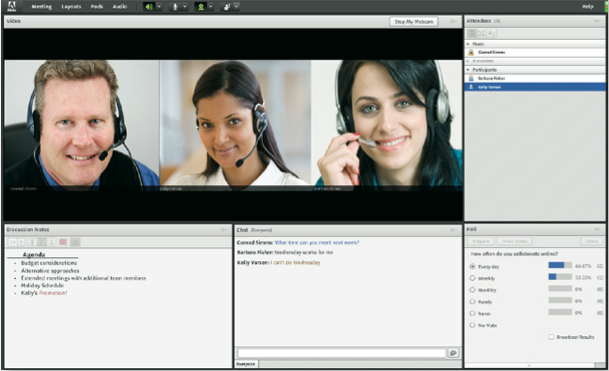
What you get: Adobe Connect includes all of the usual conferencing features--whiteboards, presentation sharing, app and desktop sharing, and chat--coupled with excellent video support. In addition to providing unlimited simultaneous webcam video, Connect lets you stream audio and video files from your desktop easily. The service includes mobile apps for iOS, Android, and even the BlackBerry Playbook.
Our take: Adobe Connect primarily targets large enterprises, rather than small businesses, but its in-conference interface is among the simplest in the bunch. The ability to stream video and audio from your desktop to your attendees without great effort is a huge benefit, and we found Connect's video quality to be superb. For smaller companies, this option may be overkill, however, and setting up meetings is slightly more cumbersome than with competing services.
Cisco WebEx Meeting Center (Editor's Choice)

What it costs: $19 per month for one host and up to 8 attendees; $49 per month for one host and up to 25 attendees.
What you get: WebEx delivers some of the best video performance around, and it includes a feature that automatically highlights the video box of the person who's currently speaking, which is awesome when you're on a call with more than a few attendees. You can view up to seven video feeds at once. Your attendees can access the meeting from any PC, even a Solaris or Unix system, or from an iOS, Android, or BlackBerry phone. File sharing, collaborative whiteboards, chat, screen sharing, and remote control all work intuitively; and handing off control over the conference or presentation is simple. You can even record your meetings for later playback and review. Meeting scheduling includes integrated support for Microsoft Outlook.
Our take: It's hard to beat WebEx's video performance and sharing capabilities, and the service's feature list is impressive. Those considerations, combined with the ability to set up eight-person meetings for $19 per month, is a real differentiator--earning this service our nod as the top pick in the pack. By far the most established competitor in this field, WebEx continues to deserve its position as the standard bearer in the industry.
Citrix GoToMeeting
What it costs: $49 per month for up to 15 attendees.
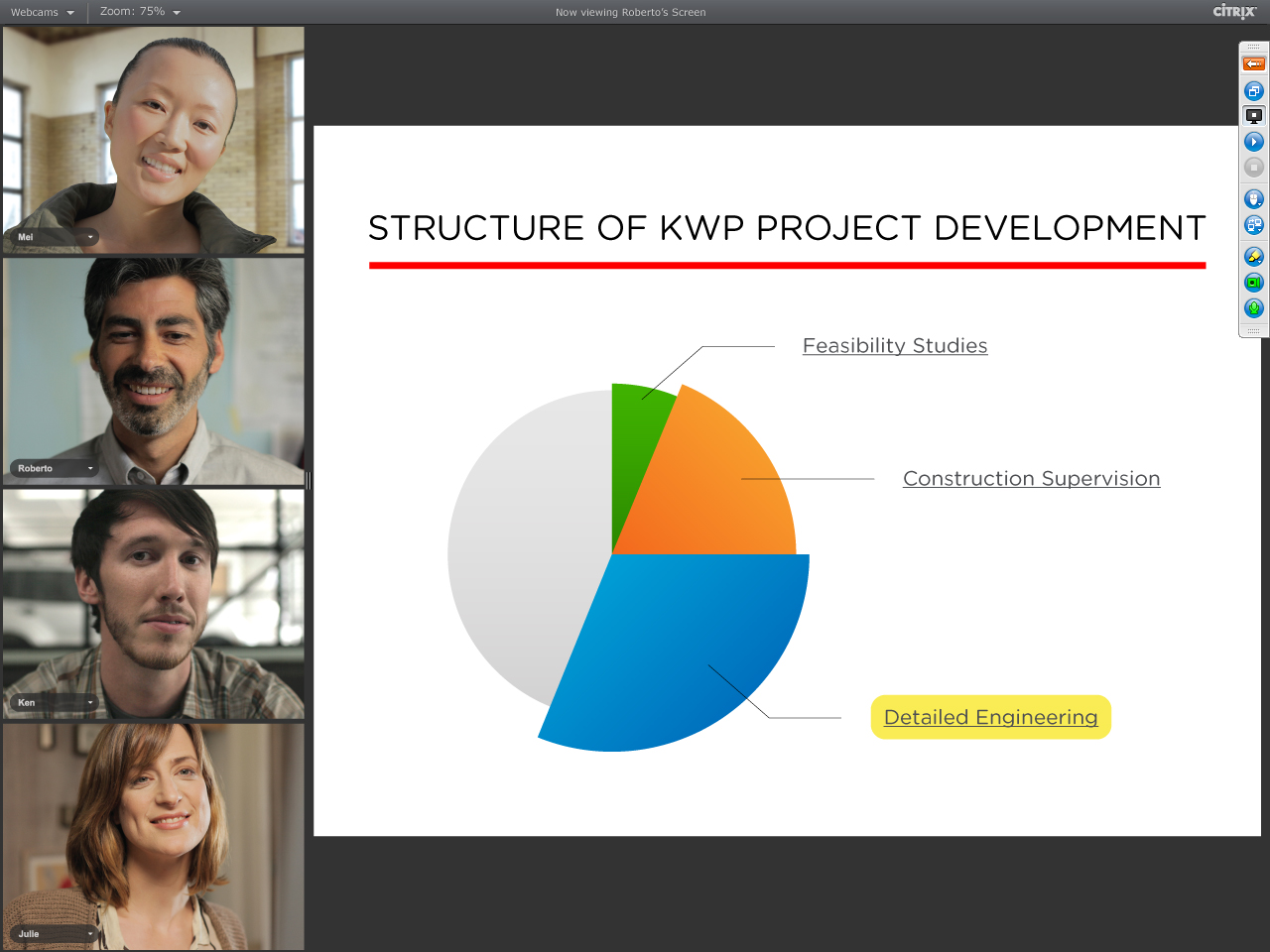
What you get: GoToMeeting now includes a video service called HDFaces, which offers a fairly slick videoconferencing interface for viewing up to six streams of video simultaneously. The service also lets you share documents, whiteboards, and your desktop screen in much the same way as WebEx, though for fewer attendees (15 instead of 25). Like WebEx, GoToMeeting lets you record a conference with one click, and quickly change presenters on the fly. It also includes a very good iPad app, along with support for the iPhone and Android.
Our take: At the same price as WebEx, GoToMeeting gives you less functionality and supports significantly fewer users. Though we found GoToMeeting slightly easier to use than WebEx, we didn't think the difference in intuitiveness of the interface was significant enough to justify paying the same amount of money for a less robust service.
Fuze Meeting

What it costs: $29 per month for 25 attendees, or $49 per month for 45 attendees; $10 for a one-day pass for 15 attendees.
What you get: Fuze Meeting includes most of the standard videoconferencing fare, such as chat, whiteboards, document sharing, and desktop and app sharing. At the $49 Plus level, it lets you record conferences for later playback. Fuze also lets you easily brand your conference space with your company logo, so you can make a big impression with minimal effort. You get support for up to 10 simultaneous video feeds, and the service includes the novel ability to call into the voice channel via Skype. All accounts come with storage space included, starting at 1GB for daily accounts and moving up from there. The mobile apps for iOS, Android, and BlackBerry are beautifully designed.
Our take: Fuze didn't deliver the best video performance in our trials, but it stands out with some interesting features. The ability to dial in via Skype makes it awesome for international conferences, and we love the $10 single-day option for small businesses that only need occasional conferencing.
How the Cloud Can Make Your Small Business Look Bigger
"On the Internet, no one knows you're a dog." It's much the same thing with cloud technology and small companies. With the cloud, no one knows you're a small business
By Anne Field
By Anne Field
You know that cartoon where two pooches are at a computer and one says to the other "On the Internet, no one knows you're a dog"? Well, it's much the same thing with cloud technology and small companies. That is, with the cloud, no one knows you're a small business.
Case in point: Two years ago, the lease was about to expire on the Los Angeles offices of James Sinclair's restaurant and hotel consulting company OnSite Consulting, so he had to decide whether to renew. After studying the numbers and alternatives, Sinclair had a better idea. He realized he simply didn't have to be in one location and he didn't need to sink capital into all those servers and all that software. Instead, he and his 65 employees could work virtually, tapping into applications on a cloud hosting service to do everything from sharing documents to retrieving customer information.
But a funny thing happened in the process. Sinclair discovered that by using a cloud vendor he could get a higher level of functionality that made OnSite look like a much larger company. Take project management. Customers were now able to log on, see who had performed what, and get insight into due dates, outstanding tasks and a variety of other data--the kind of comprehensive, detailed, up-to-the-minute information you wouldn't expect from a small enterprise.
And it was highly affordable. In fact, all his cloud applications cost about $400 a month—"significantly" less, he says, than his less-capable in-house IT setup.
Sinclair wasn't trying to pull the wool over anyone's eyes, but he's not sorry that he appears to have the resources of a 500- or 5,000-employee competitor. In fact, one boutique hotel owner confided he'd chosen OnSite thanks, in part, to the company's project management system and the confidence it gave him in OnSite's capacity to outperform much bigger competitors. Sean Baird, an IT Consultant in Conshohocken, Pa., who specializes in cloud technology, puts it this way: "If customers have the ability to check on the status of a project 24/7, that's a big company kind of thing."
That said, if you want to use the cloud to look bigger, how do you go about it?
Think customer-facing. What Sinclair stumbled upon, other businesses are pursuing strategically—looking at cloud options that will give them the greatest payoff. "Evaluate the interfaces where you interact with your customer and that's where you would begin to design more professional or advanced types of communication," says Treff LaPlante, who heads WorkXpress, an IT and cloud technology consulting firm in Harrisburg, Pa. That can include anything from billing and email to project management and telephone systems.
Combine applications. Sean O'Rourke, a principal at Syzygy 3, a New York City IT consultancy, helped a pet shelter expand its customer service abilities without paying for a pricey call center. The company re-assigned 20 of its 110 employees to answer calls from their own homes from 6 p.m. to midnight, using a voice-over IP phone system. Clients would call the shelter and press the option for customer service, without having a clue they actually were reaching someone sitting in, say, his kitchen. Then, the home-based employee would log onto the website of another cloud provider to access the appropriate customer records. The cost: $5 to $10 per user per month.
Don't fake it. The point isn't to make yourself appear bigger if you can't deliver the goods. Says Sinclair: "Ultimately, customers judge us on our performance."
Friday, September 2, 2011
Cisco Acquires Versly
September 1, 2011
Cisco has recently announced its acquisition of Versly, a privately-held company that integrates collaboration capabilities into Microsoft Office applications.
As collaboration is one of Cisco's top priorities, this acquisition will provide Cisco and its partners with more opportunities to provide enhanced collaboration solutions. Versly's software will be integrated into a wide range of Cisco's collaboration offerings, such as Cisco Quad and Cisco Jabber.
"Cisco’s acquisition of Versly is move about acquiring skills than the product, according to an analyst briefing by Cisco," says David H. Yedwab. "The ability to add the ability to collaborate on Office documents, including Word and Outlook into Cisco’s collaboration offers – WebEx, Quad and Jammer – could be interesting as multi-media collaboration grows in the 'Post PC Era.'”
According to Marty Parker, co-founder of UCStrategies, “Cisco’s acquisition of Versly is clearly focused on better integration of Cisco Unified Communications and Collaboration with Microsoft Office. Most business collaboration is based on shared information and documents (posts on UCStrategies and NoJitter). Versly offers Cisco a connection of the Cisco UC platform to Microsoft’s leading business platform for document creation and editing. This is a realistic move by Cisco.”
The financial terms of the transaction have yet to be disclosed. For more information, visit www.cisco.com.
Cisco has recently announced its acquisition of Versly, a privately-held company that integrates collaboration capabilities into Microsoft Office applications.
As collaboration is one of Cisco's top priorities, this acquisition will provide Cisco and its partners with more opportunities to provide enhanced collaboration solutions. Versly's software will be integrated into a wide range of Cisco's collaboration offerings, such as Cisco Quad and Cisco Jabber.
"Cisco’s acquisition of Versly is move about acquiring skills than the product, according to an analyst briefing by Cisco," says David H. Yedwab. "The ability to add the ability to collaborate on Office documents, including Word and Outlook into Cisco’s collaboration offers – WebEx, Quad and Jammer – could be interesting as multi-media collaboration grows in the 'Post PC Era.'”
According to Marty Parker, co-founder of UCStrategies, “Cisco’s acquisition of Versly is clearly focused on better integration of Cisco Unified Communications and Collaboration with Microsoft Office. Most business collaboration is based on shared information and documents (posts on UCStrategies and NoJitter). Versly offers Cisco a connection of the Cisco UC platform to Microsoft’s leading business platform for document creation and editing. This is a realistic move by Cisco.”
The financial terms of the transaction have yet to be disclosed. For more information, visit www.cisco.com.
Subscribe to:
Posts (Atom)